Handwriting and Digitization
Graduate Quantitative Economics and Datascience
From Images to Data
Three Ways to Read Handwriting
| Approach | Output | Main tradeoff |
|---|---|---|
| OCR specialist: Chandra | Document → HTML table | Native table output; limited instruction following |
| General vision-language model: Qwen or Claude | Image → requested JSON | Flexible; check guesses and omissions |
| Corpus fine-tune: adapted Chandra | Archive’s HTML / JSON | Learns local conventions; needs labeled pages |
- These models process images and text together
- Local versus hosted is a separate choice: MLX/Ollama use our hardware; Claude sends images to a paid service
- Background: Melissa Dell’s OCR and Record Linkage (lecture notes) and survey, §8.5
Reading the Letters Is Only Part of the Task
- Full page: the model must locate the table, identify columns, and associate each value with a person
- Prepared panels or row crops: we supply some of that structure. Recognition becomes easier, but somebody must prepare the inputs
- HTML or JSON → DataFrame: a parseable table can still have shifted columns, omitted people, or invented values
- Compare reading accuracy and extraction coverage. A model that reads the surviving cells well may still lose much of the table
- Toronto uses prepared ten-row panels; Paris compares pages with row crops; Argentina exposes a full-page layout failure
What Does Fine-Tuning Change?
- Prompting: choose instructions and perhaps show examples; the model’s weights stay fixed
- Fine-tuning: start with a pretrained model and update parameters using images paired with correct output text
- LoRA (low-rank adaptation): freeze the original weights and learn small update matrices. Save these as an adapter that needs the matching base model
- Quantization: store weights with fewer bits to reduce memory. Downloading, quantizing, or merging an existing adapter does not train a model
- Here we run published models and adapters. We do no training. See the PEFT LoRA guide and the optional section at the end
Training, Development, and Test Mean Different Things
| Split | What its labels are used for |
|---|---|
| Training | Update weights or LoRA parameters |
| Development / validation | Choose prompts, image size, training settings, and parsing/scoring rules |
| Test | Measure the frozen workflow on new documents |
- Split writers/documents before making crops: rows on one page share handwriting and context
- Even without training, choose prompts on development pages and evaluate on test pages
- Changes after seeing test failures make revised scores exploratory; a final estimate needs untouched pages
- Held out from fine-tuning does not mean absent from base-model pretraining
What Evidence Will These Examples Provide?
| Example | Development or training | Evaluation shown here |
|---|---|---|
| Toronto | 1 development page; no training by us | 8 other writers, 103 labeled people |
| Paris | 2 development pages; no training by us | 4 other writers, 120 annotation rows |
| Argentina: seen page | Page used to train the published adapter | 15 people; training-page demonstration |
| Argentina: held-out page | Author’s blur-model test split | 15 people; author-selected best page, blurred input |
| Thai bill | Image from the published dataset’s train split | One crop; no held-out accuracy claim |
- Toronto and Paris also include retrospective scoring or alignment changes, identified alongside their results
- These are different tasks and levels of assistance. Their percentages do not form one overall model ranking
Toronto, 1901
Vibe-coding Warning!
This material has not yet been fully vetted and checked.
Turning a Census into Economic Data
import json
from pathlib import Path
import pandas as pd
from PIL import Image as PILImage
from IPython.display import Image, display, Markdown, HTML

ocr_dir = Path("data/handwriting")
toronto_dir = ocr_dir / "toronto"
toronto_sample = json.loads(
    (toronto_dir / "scores/test_sample.json").read_text())
- Who worked, in what occupation, and for how much? Canada’s 1901 census records names, ages, occupations, and earnings
- OCR turns pixels into text. A document model can also return a table we can load into pandas
- Compare Chandra OCR 2, Qwen3.8 27B, and Qwen3.5 2B, running locally with the tools from the open-weight LLM lecture
- Scan: Library and Archives Canada, RG31-C-1, enumerator James F. Hutchman
Research Labels Already Exist
- York’s Toronto Area Test Sample contains 52,702 people from a 20% sample of dwellings. These are human-entered research records
- We match scans using district, subdistrict, poll, page, enumerator, and physical line number; the published page identifiers need inspection
- York’s name “Test Sample” describes its research dataset. It is not a predefined OCR train/test split
Toronto: Our Split, with No Model Training
| Role | Pages / writers | Labeled people | Used for |
|---|---|---|---|
| Development | 1 / 1 | 26 | Design panels and prompts |
| Test | 8 / 8 | 103 | Compare with York records |
- Page IDs were fixed before inference, using scan availability and verified alignment; this is not a random sample
- Transcribe 400 visible rows; score 103 York records. The other 297 people have no labels
- Writers do not overlap. No weights are fitted; no reference answers enter the prompts
- Column recovery and digit scoring were revised after viewing outputs: exploratory scores on saved runs
Give Each Model the Same Image
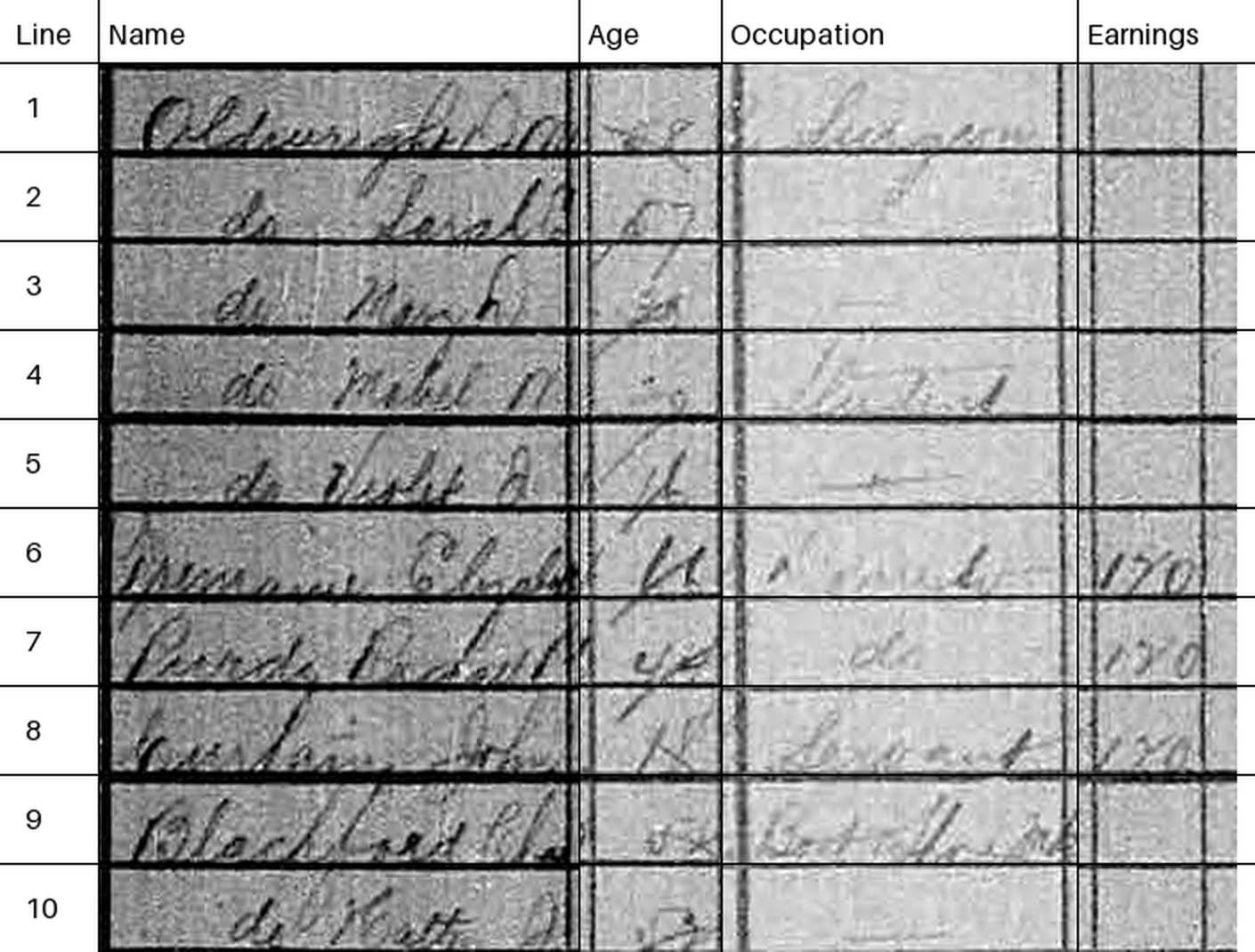
- Manually locate the page, columns, and row boundaries; rectify the scan and assemble ten-row panels
- Add modern headings and physical line numbers. Every model receives the same 1410 × 1070 PNG
- This measures assisted transcription. Automatic page layout recovery is a separate task
- LAC source scan, lines 1–10. Geometry and download code are included
Three Local Workflows
| Workflow | Local runtime | Output |
|---|---|---|
| Chandra OCR 2 | MLX, BF16 weights | Native OCR prompt → HTML |
| Qwen3.8 27B | Ollama MLX, MXFP8 | Fixed schema prompt → JSON |
| Qwen3.5 2B | Ollama, GGUF Q8_0 | The same JSON prompt |
- Temperature 0, at most 4,096 output tokens per panel; Qwen thinking disabled
- Chandra is an OCR specialist. Qwen is a general vision-language model; use each model’s supported interface
- We compare complete workflows, including quantization and prompts. These results do not isolate model weights
- All three were run on an Apple M4 Max with 64 GB. No fine-tuning is performed
Download Chandra from Hugging Face
From the repository root, install the optional packages on an Apple Silicon Mac:
Then run this Python code once:
- Downloads weights, tokenizer, and processor at the pinned revision; existing files are reused
- About 10 GB for the weights, plus inference memory. Hub download docs; NVIDIA/vLLM alternative
Chandra: an Image Path to HTML
from chandra.prompts import OCR_PROMPT
from mlx_vlm import load, generate
from mlx_vlm.prompt_utils import apply_chat_template
from mlx_vlm.utils import load_config

model_path = "build/handwriting/model"
image_path = "slides/data/handwriting/toronto/input_illustration.png"
model, processor = load(model_path)
prompt = apply_chat_template(
    processor, load_config(model_path), OCR_PROMPT, num_images=1,
)
result = generate(
    model, processor, prompt, image=[image_path],
    max_tokens=4096, temperature=0.0, verbose=False,
)
html = result.text
print(html)- MLX loads the model inside Python; this call needs no server. Reuse
modelandprocessorfor further images handwriting_mlx.pytakes any local image path. The saved benchmarks use MLX’s server interface; the MLX Python interface exposes the same model
Download Qwen and Describe the Output
With Ollama installed and running, choose a model:
Use the same instruction for both vision-language models:
prompt = (
    'Extract every row of this census table as JSON. Return only an object '
    'with key "rows", a list of objects with string fields "line", "name", '
    '"age", "occupation", "earnings". Read only the image. Preserve spelling '
    'and abbreviations, including ditto marks. Do not fill blanks or infer '
    'missing values. Use an empty string for an empty cell. Keep every row in '
    'printed order. No commentary.'
)- The 2B model needs less memory; the 27B MXFP8 run here uses Ollama’s Apple Silicon MLX runtime. These are image-capable chat models, not
qwen3-embedding
Qwen: the Same Image Path to JSON
import base64, json
from pathlib import Path
from urllib.request import Request, urlopen

image_path = Path("slides/data/handwriting/toronto/input_illustration.png")
encoded = base64.b64encode(image_path.read_bytes()).decode()
payload = {
    "model": "qwen3.5:2b", "stream": False, "think": False,
    "messages": [{"role": "user", "content": prompt, "images": [encoded]}],
    "options": {"temperature": 0, "num_predict": 4096, "num_ctx": 16384},
    "keep_alive": "10m",
}
request = Request("http://127.0.0.1:11434/api/chat",
    data=json.dumps(payload).encode(),
    headers={"Content-Type": "application/json"})
with urlopen(request, timeout=600) as response:
    reply = json.load(response)
print(reply["message"]["content"])promptis the preceding slide’s instruction. Changemodeltoqwen3.8:27b-mxfp8for the larger model- Ollama’s image API takes base64 bytes. Responses can contain Markdown fences or stop early; the batch reader handles these before scoring
Run One Image, Then the Full Example
From the repository root, using the included Toronto panel:
- These small scripts print the raw model response. Replace the final path with your own image; Qwen accepts
--model qwen3.8:27b-mxfp8 - For the complete sample,
build_toronto_census.pydownloads and prepares the panels;toronto_census_ocr.pyruns them and saves responses, CSVs, and metadata. Full commands - In lecture notebooks, images are under
data/handwriting/. Model calls are displayed, not executed when rendering
From Model Output to a DataFrame
| line | name | age | occupation | earnings |
|---|---|---|---|---|
| 1 | Oldenburg John | 48 | Barge man | |
| 2 | do Sarah | 47 | ||
| 3 | do Mary | 20 |
- These are Qwen 27B predictions for the illustrated panel, including any mistakes. JSON and Chandra’s HTML cells become the same columns
""means an extracted blank;NaNmeans unavailable output. Neither means zero earningspage_idandlinejoin predictions to references. Names and occupations remain raw, unscored strings
Score Individual Digits
- Score age and earnings after currency normalization, whole-dollar rounding, and converting infant ages to completed years
\[ \text{Digit accuracy} = 1 - \frac{\text{substitutions + deletions + insertions}} {\text{reference digits}} \]
- Align characters within each person’s value using minimum edit distance.
53 → 23has one error among two digits: 50%;350 → 35gives 66.7% - Sum edits and reference digits over available filled cells. An extracted blank loses every reference digit;
NaNis excluded and reported in coverage - Extra digits or unrecognized characters count as edits. Blank reference cells and exact whole-value agreement are reported separately
Digit Accuracy on the 103 Test People
toronto_scores = pd.read_csv(toronto_dir / "scores/test_field_scores.csv")
toronto_models = {"chandra": "Chandra OCR 2",
                  "qwen27b": "Qwen 27B", "qwen2b": "Qwen 2B"}
toronto_table = pd.DataFrame(index=["age", "earnings"])
for model, name in toronto_models.items():
    score = toronto_scores.loc[toronto_scores.workflow.eq(model)]
    score = score.set_index("field")
    toronto_table[name] = [
        f"{r.digit_accuracy:.1%}" for r in score.loc[
            toronto_table.index].itertuples()]
display(HTML(toronto_table.to_html()))| Chandra OCR 2 | Qwen 27B | Qwen 2B | |
|---|---|---|---|
| age | 77.4% | 79.0% | 74.2% |
| earnings | 82.5% | 83.7% | 81.4% |
- Age: 186 reference digits, covering all 103 labeled people for each model
- Earnings: Chandra covers 27/29 filled cells (80 digits); each Qwen covers 29/29 (86 digits). Accuracy is conditional on these available values
- These scores compare normalized research labels, using the split and retrospective scoring rules described earlier
- Errors can cluster by writer and page. Eight writers do not establish a general model ranking
Report Coverage Alongside Accuracy
toronto_structure = pd.read_csv(toronto_dir / "scores/test_structure.csv")
diagnostics = pd.DataFrame(index=list(toronto_models.values()))
diagnostics["Age cells available"] = [
    f"{r.age_available}/{r.expected_cells_per_field}"
    for r in toronto_structure.itertuples()]
diagnostics["Earnings cells available"] = [
    f"{r.earnings_available}/{r.expected_cells_per_field}"
    for r in toronto_structure.itertuples()]
earnings_rows = toronto_scores.loc[toronto_scores.field.eq("earnings")]
diagnostics["Blank earnings: matches / available"] = [
    f"{r.blank_correct}/{r.blank_available}"
    for r in earnings_rows.itertuples()]
display(HTML(diagnostics.to_html()))| Age cells available | Earnings cells available | Blank earnings: matches / available | |
|---|---|---|---|
| Chandra OCR 2 | 400/400 | 360/400 | 66/68 |
| Qwen 27B | 392/400 | 392/400 | 74/74 |
| Qwen 2B | 400/400 | 400/400 | 73/74 |
- Keep uniquely numbered rows and unambiguous columns; unavailable values become
NaN, without rejecting the rest of the table - Coverage includes all 400 visible rows. Four Chandra earnings columns are unavailable; their ages remain usable
- Of 74 labeled blank earnings cells, Chandra has 68 available; six are
NaN. Qwen 27B’s eight unavailable rows have no York labels - The label audit flags three ages on two pages (Maclennan and Murray). We retain the published labels; agreement is not unquestionable ground truth
An Ambiguous Earnings Column Becomes NaN
Chandra creates a two-column earnings header on the Forbes page:
Its row 6 contains two earnings cells:
- There are still ten rows, but six cells per row instead of the five expected fields
- The header assigns two positions to Earnings, so that column is ambiguous. Three Forbes panels and one Moore panel have this layout
- The parser stores
NaNfor earnings and retains name, age, and occupation. It does not guess which earnings subcolumn to use - For example, Forbes line 17 becomes
age="71", earnings=NaN. The age is scored independently
Why Is Age Agreement Low?
| Disagreements | |
|---|---|
| Flagged reference | 3 |
| Hutchman page | 21 |
| Other digit disagreements | 11 |
- 35 whole-age disagreements = 103 people − 68 matches. These involve 42 digit edits among 186 digits, giving 77.4% digit accuracy
- 21 come from the Hutchman page alone. On one panel, Chandra invents the age sequence 74, 75, …, 83. Faint handwriting and our image preparation need separate investigation
- Three reference ages are flagged, not corrected. The other eleven disagreements include digit confusions such as 53 → 23
- Eight correct ages survive the unavailable earnings columns. All 103 labeled ages are included; the difficult page remains in the benchmark
How Errors Affect an Earnings Calculation
toronto_earnings = pd.read_csv(toronto_dir / "scores/test_earnings.csv")
earnings_table = pd.DataFrame({
    "Model": toronto_earnings.workflow.map(toronto_models),
    "Numeric / labeled": [
        f"{r.numeric_predictions}/{r.reference_annual_earners}"
        for r in toronto_earnings.itertuples()],
    "Paired reference mean":
        toronto_earnings.paired_reference_mean,
    "OCR mean": toronto_earnings.predicted_mean,
    "Mean abs. error": toronto_earnings.paired_mean_absolute_error,
})
display(HTML(earnings_table.to_html(index=False, float_format="${:,.0f}".format)))| Model | Numeric / labeled | Paired reference mean | OCR mean | Mean abs. error |
|---|---|---|---|---|
| Chandra OCR 2 | 26/29 | $376 | $320 | $59 |
| Qwen 27B | 27/29 | $361 | $365 | $63 |
| Qwen 2B | 27/29 | $361 | $351 | $49 |
- Select people with positive annual earnings in the reference; exclude explicitly daily, weekly, or monthly amounts
- Each model’s means and error use its own available numeric predictions. Coverage differs, so these errors are conditional on different subsets
- Missing predictions are never zeros. Formatting such as
120 00is nonnumeric under the frozen rules - Qwen 27B’s mean is $365 versus $361, yet its mean absolute error is $63. Errors can cancel; these sample means are not estimates for Toronto
Paris Census Tables
Vibe-coding Warning!
This material has not yet been fully vetted and checked.
An Archive with Literal Transcriptions
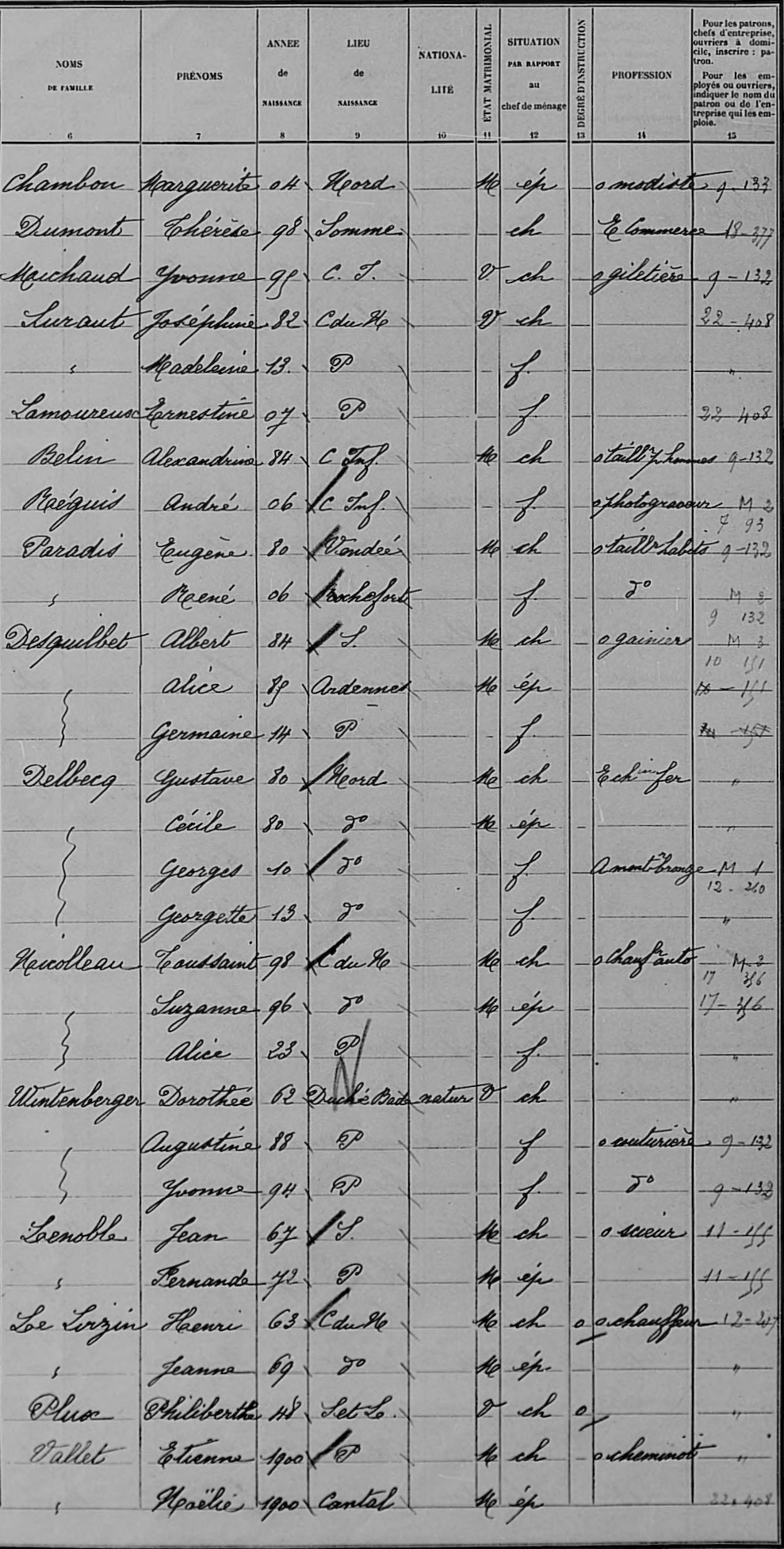
- Who lived and worked in Paris in 1926? These French tables record birthplaces, occupations, and household relationships
- The POPP census dataset has independently published literal transcriptions (Constum et al., 2022; CC BY 4.0). Images and labels ship with the notebook
- Compare recovery of a complete page with recognition of one cropped row at a time; layout and handwriting are separate sources of error
- The next lecture develops vision-language models further
A Person, a Row, Ten Fields
demo_row = ocr_labels.loc[
    ocr_labels.row_id.eq(f"{demo_page}_28")].iloc[0]
demo_image = PILImage.open(ocr_dir / "pages" / f"{demo_page}.png")
x, y, w, h = (int(demo_row[k]) for k in ["x", "y", "width", "height"])
display(demo_image.crop((x, y, x + w, y + h)).resize(
    (1100, round(h * 1100 / w)), PILImage.Resampling.LANCZOS))
display(HTML(demo_row[["surname", "given_names", "birth_year",
                       "occupation"]].to_frame().T.to_html(index=False)))
| surname | given_names | birth_year | occupation |
|---|---|---|---|
| Vallet | Etienne | 1900 | o cheminot |
- The row says Vallet, Etienne, 1900, with occupation o cheminot (railway worker). These are reference labels, before any model call
- Other columns record birthplace, nationality, marital status, relationship, education, and employer/statistical code
- Preserve the original strings:
07is a birth year as written, not an age. Expanding dates, occupation codes, and ditto marks is a separate research decision
Paris: Preserve the Source’s Writer Split
| Source split | Used in this lecture | Purpose |
|---|---|---|
| Training | No pages used for fitting | Available for a future fine-tune |
| Validation | 2 pages / 2 writers / 60 people | Choose prompt and image size |
| Test | 4 pages / 4 other writers / 120 rows | Compare saved predictions |
- Four of eight source test double pages, left pages only; IDs fixed before inference
- 120 annotations = 119 people + 1 employer-code-only region, with ten fields each
- Scoring and alignment were revised after viewing outputs; automatic and assisted results stay separate
- Public since 2022; base-model pretraining exposure is unknown. Provenance
Paris: Prepare a Page for Chandra
Start the local server with the Chandra OCR 2 weights downloaded earlier:
In a separate Python session, from the repository root:
import base64
from io import BytesIO
from pathlib import Path
from PIL import Image

image_path = (Path("slides/data/handwriting/pages")
              / "AD075DP_D2M8_275_0025_left_page.png")
image = Image.open(image_path)
image = image.resize((image.width * 2, image.height * 2),
                     Image.Resampling.LANCZOS)
buffer = BytesIO()
image.convert("RGB").save(buffer, format="PNG")
encoded = base64.b64encode(buffer.getvalue()).decode()- The script doubles the page dimensions, then encodes its pixels for the request. The row runs instead crop an annotation box and resize it to 128 pixels high
Paris: Call Chandra from Python
from chandra.prompts import OCR_PROMPT
from openai import OpenAI

client = OpenAI(base_url="http://127.0.0.1:8081/v1",
                api_key="local", timeout=300)
response = client.chat.completions.create(
    model="build/handwriting/model",
    messages=[{"role": "user", "content": [
        {"type": "image_url", "image_url": {
            "url": f"data:image/png;base64,{encoded}"}},
        {"type": "text", "text": OCR_PROMPT},
    ]}],
    temperature=0, max_tokens=8192,
)
html = response.choices[0].message.content
print(html)encodedis the preceding slide’s image.OCR_PROMPTrequests Chandra’s HTML transcription; no reference answers enter the request- The
OpenAIclient talks to our local MLX server with a placeholder key. Code: single-page script, batch script
From HTML to pandas
| surname | given_names | birth_year | occupation |
|---|---|---|---|
| Chambon | Marguerite | 84 | o modiste |
| Dumont | Thérèse | 98 | É commerce |
| Mauchaud | Yvonne | 99 | giletière |
- This is the table from the saved Chandra response. The full reader preserves strings and names the columns; parsing does not verify handwriting
Calling Hosted Claude from Python
With Claude Code installed and signed in, from the repository root:
import json, shutil, subprocess, tempfile
from pathlib import Path

data = Path("slides/data/handwriting")
image_path = data / "pages/AD075DP_D2M8_275_0025_left_page.png"
instruction = (data / "claude_prompt.txt").read_text()
with tempfile.TemporaryDirectory() as folder:
    shutil.copyfile(image_path, Path(folder) / "census.png")
    result = subprocess.run(
        ["claude", "-p", "--model", "opus", "--output-format", "json",
         "--tools", "Read", "--allowedTools", "Read"],
        input=instruction + "census.png", cwd=folder,
        text=True, capture_output=True, check=True,
    )
print(json.loads(result.stdout)["result"])- This uploads the image for hosted inference; no Claude weights download. The temporary folder contains only the scan
claude_prompt.txtrequests ten transcription fields, without reference answers. Batch script; CLI docs. The saved run resolvedopusto Opus 5.5
What Counts as Correct?
- Align rows and fields first; score each cell independently. An ambiguous merged cell becomes
NaN, preserving the other columns. An extracted blank remains a prediction - Character accuracy = 1 − character edits / reference characters, summed within available filled cells. Numeric birth years use the same calculation digit by digit; keep stray predicted characters as errors
- Keep case, accents, punctuation, and ditto marks. Only annotation markers, Unicode, and whitespace are normalized. Insertions can make accuracy negative
- Report coverage beside accuracy. Exact recovery over all reference cells also counts extraction failures: unavailable cells contribute zero correct cells
- Source-checked alignment repairs are labeled assisted; the automatic extraction results remain separate
Reading the 120 Annotation Rows
ocr_scores = pd.read_csv(ocr_dir / "scores/field_scores.csv")
claude_scores = pd.read_csv(ocr_dir / "claude_scores/field_scores.csv")
fields_shown = ["surname", "given_names", "birth_year", "occupation"]
accuracy_table = pd.DataFrame({
    "Field": ["Surname", "Given names", "Birth year (digits)", "Occupation"],
})
for label, scores in [("Chandra OCR 2 (page)", ocr_scores),
                       ("Claude Opus 5.5", claude_scores)]:
    scores = scores.set_index("field")
    accuracy_table[label] = [scores.loc[f, "digit_accuracy"
        if f == "birth_year" else "character_accuracy"] for f in fields_shown]
display(HTML(accuracy_table.to_html(formatters={
    "Chandra OCR 2 (page)": "{:.1%}".format,
    "Claude Opus 5.5": "{:.1%}".format,
}, index=False)))
ocr_summary = pd.read_csv(ocr_dir / "scores/summary.csv").iloc[0]
claude_summary = pd.read_csv(ocr_dir / "claude_scores/summary.csv").iloc[0]
display(Markdown(
    f"Separate run, Chandra row crops: **{ocr_summary.cer:.1%} CER**, "
    f"**{ocr_summary.wer:.1%} WER**; "
    f"{int(ocr_summary.exact_lines)}/120 exact lines."
))| Field | Chandra OCR 2 (page) | Claude Opus 5.5 |
|---|---|---|
| Surname | 86.9% | 95.4% |
| Given names | 91.1% | 98.4% |
| Birth year (digits) | 94.2% | 97.8% |
| Occupation | 56.8% | 90.0% |
Separate run, Chandra row crops: 35.1% CER, 78.1% WER; 0/120 exact lines.
- Source-audited alignment: all filled cells in these four fields are available. Across all ten fields, available cells cover 99.9% of reference characters; this is coverage, not correctness
- Both models saw the same images and no labels. Claude used a column-specific JSON prompt; this compares workflows. Exact-cell scores and every denominator are saved
Layout Recovery Remains Visible
structure = pd.read_csv(ocr_dir / "scores/structure.csv")
claude_structure = pd.read_csv(ocr_dir / "claude_scores/structure.csv")
structure_table = pd.DataFrame([
    {"Model": name,
     "Automatic cells": f"{s.automatic_cells:.0f}/1200",
     "After source audit": f"{s.available_cells:.0f}/1200",
     "Automatic exact recovery": f"{s.automatic_exact_yield:.1%}"}
    for name, s in [("Chandra OCR 2", ocr_summary),
                    ("Claude Opus 5.5", claude_summary)]
])
display(HTML(structure_table.to_html(index=False)))| Model | Automatic cells | After source audit | Automatic exact recovery |
|---|---|---|---|
| Chandra OCR 2 | 895/1200 | 1185/1200 | 47.1% |
| Claude Opus 5.5 | 900/1200 | 1190/1200 | 54.8% |
- Both emit 30, 30, 30, 29 rows: 3/4 annotation counts match. This is a count check, not proof of correct layout
- On the final page, a source-image audit finds 29 people plus an employer-code-only annotation, possibly overlapping the last person. Align those 29 rows; retain the extra reference region as
NaN - Chandra returns two braces spanning five blank surname cells. Our per-person projection leaves these
NaN, retaining the other columns; Claude has no such spans - Automatic exact recovery divides correct cells by all 1,200 cells. Coverage measures availability, not correctness; the audit never changes predicted text
Inspect the Image Behind an Error
ocr_errors = ocr_cells.loc[
    ocr_cells.available & ocr_cells.filled & ocr_cells.correct.eq(0)
    & ocr_cells.field.isin(["surname", "given_names", "occupation"])]
error_id = ocr_errors.iloc[0].row_id
error_row = ocr_labels.set_index("row_id").loc[error_id]
error_image = PILImage.open(
    ocr_dir / "pages" / f"{error_row.page_id}.png")
x, y, w, h = (int(error_row[k]) for k in ["x", "y", "width", "height"])
display(error_image.crop((x, y, x + w, y + h)).resize(
    (1100, round(h * 1100 / w)), PILImage.Resampling.LANCZOS))
error_table = ocr_cells.loc[
    ocr_cells.row_id.eq(error_id) & ocr_cells.field.isin(fields_shown),
    ["field", "reference", "prediction"],
]
display(HTML(error_table.to_html(index=False)))
| field | reference | prediction |
|---|---|---|
| surname | Brandarge | Brandorge |
| given_names | Robert | Robert |
| birth_year | 22 | 22 |
| occupation |
- A plausible surname can still break record linkage; a plausible occupation can change an economic classification
- The reference is the published transcription, not agreement between two models. Ambiguous source labels need a separate human audit
Blank Cells Can Make Accuracy Look Good
                  labeled  available  exact_agreement
Blank reference       394        380         0.928947
Filled reference 806 805 0.460870- The education column is blank in all 120 annotation rows. Returning nothing there is easy; it tells us nothing about reading an occupation
- Do not treat extracted variables as error-free data. Errors depend on the writer, field, scan, and abbreviations; they can change which people link across censuses
- For a larger corpus, label new pages from each period and handwriting style, inspect failures, and keep an untouched evaluation sample
Run the Paris Comparison
Start the MLX server as in the setup commands, then:
mkdir -p build/handwriting/chandra
export OCR_MODEL=build/handwriting/model
uv run --extra handwriting \
  python utilities/build_handwriting_predictions.py \
  --split test --mode pages --output build/handwriting/chandra
uv run --extra handwriting \
  python utilities/build_handwriting_predictions.py \
  --split test --mode rows --output build/handwriting/chandra
uv run --extra handwriting \
  python utilities/build_handwriting_scores.py \
build/handwriting/chandra --output build/handwriting/scores- Images, labels, and saved responses ship with the notebooks repository. These commands save new results in
build/ - Dataset attribution, source metadata, and scoring script
Fine-Tuning for a Corpus
What Did the Census Author Train On?
The thesis reports this split for its final blur-trained model:
| Role | Pages | Purpose |
|---|---|---|
| Training | 110 | Learn the adapter; includes 33 pages from 1855 |
| Development (“evaluation”) | 14 | Select the model; includes 3 pages from 1855 |
| Final test | 14 | Excluded from training and tuning |
- The original adapter’s full membership is less clearly documented. We train neither one
- We show one training page and the author’s best final-test page
- Complete final-test image–label pairs are unavailable; this is not the full benchmark. Thesis, §5.4 and §6
Vibe-coding Warning!
This material has not yet been fully vetted and checked.
A Census Fine-Tune: Argentina, 1895
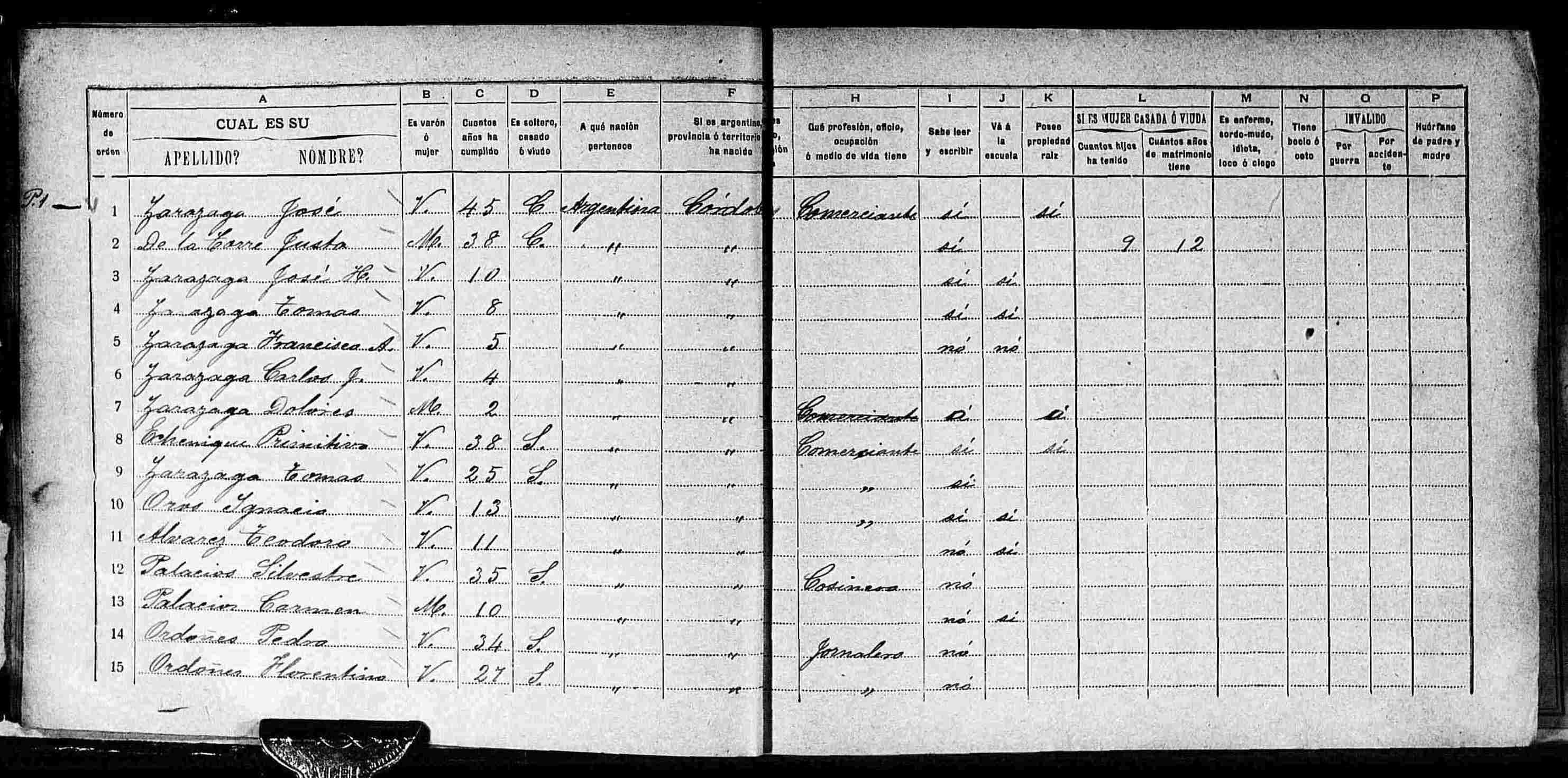
- Spanish, in Roman script. Image 10 of 168, from the author’s training set
- FamilySearch scan via Ledin (2026): source image directory. Downloaded on demand
A Small Adapter, a Specific Table
Saucystream/fine_tuned_chandraadapts the original Chandra, an 8B model. The Paris example above uses Chandra OCR 2- LoRA learns small matrix updates while holding the base weights fixed. This adapter uses rank 8 and alpha 16 on the language model’s query, key, and value attention projections
- The author’s training pairs whole census pages with JSON tables.
Aholds surname and given names,Cage,Hoccupation,Iliteracy, andKproperty ownership - Blank cells are
"*"; split columns become lists. These conventions are part of the task the adapter learns - The author’s code trains against a 4-bit base. We merge the published adapter into BF16 weights and run locally with MLX, without training. A training-page comparison does not measure performance on unseen pages
Download the Base Model and Its Adapter
These calls fetch existing parameters from Hugging Face:
import torch
from peft import PeftModel
from transformers import AutoModelForImageTextToText

base = AutoModelForImageTextToText.from_pretrained(
    "datalab-to/chandra",
    revision="bd40c21576564d31ba99f204e28ccd5c4c1751fa",
    dtype=torch.bfloat16, device_map="cpu",
)
adapted = PeftModel.from_pretrained(
    base, "Saucystream/fine_tuned_chandra",
    revision="d94b4ca422dd87e06b55abdd955bb199879a545a",
)
merged = adapted.merge_and_unload()merge_and_unload()adds the learned updates to the base weights. No optimizer or training step occursbuild_handwriting_argentina_model.pyalso saves the weights, processor, and MLX configuration tobuild/handwriting/argentina-model. PEFT merging docs
From the Census Image to JSON
{
  "A": [
    "Zarazaga",
    "José"
  ],
  "C": 45,
  "H": "Comerciante",
  "I": "si",
  "K": "si"
}- Selected fields for the first person, from a response containing 15 people.
Comerciantemeans merchant - The model generates this JSON directly. We keep the complete response and leave blanks (
"*") and ditto marks uninterpreted
From Census JSON to pandas
people = pd.DataFrame(argentina["data"])
names = pd.DataFrame(people["A"].tolist(), columns=["surname", "given_names"])
people = pd.concat([names, people[["B", "C", "H", "I", "K"]]], axis=1)
people = people.rename(columns={
    "B": "sex", "C": "age", "H": "occupation",
    "I": "literacy", "K": "property_owner",
})| surname | given_names | age | occupation |
|---|---|---|---|
| Zarazaga | José | 45 | Comerciante |
| De la Torre | Juana | 38 | * |
| Zarazaga | José H. | 10 | * |
- These are model predictions, with no reference labels in the prompt. Blank cells (
"*") and ditto marks remain uninterpreted; valid JSON does not verify a name
Does Newer Chandra Beat the Fine-Tune?
comparison = pd.read_csv(argentina_dir / "scores/summary.csv").set_index("model")
workflows = ["Chandra 1 / HTML", "Chandra 1 + LoRA / JSON",
             "Chandra OCR 2 / HTML"]
result = comparison.loc[workflows]
rate_table = pd.DataFrame({
    "Model / output": workflows,
    "Character accuracy": result.character_accuracy.map("{:.1%}".format),
    "Age digit accuracy": result.digit_accuracy.map("{:.1%}".format),
    "Exact-cell errors": [f"{r.errors:.0f}/{r.available_cells:.0f}"
                          for r in result.itertuples()],
})
display(HTML(rate_table.to_html(index=False)))| Model / output | Character accuracy | Age digit accuracy | Exact-cell errors |
|---|---|---|---|
| Chandra 1 / HTML | 68.3% | 57.7% | 63/90 |
| Chandra 1 + LoRA / JSON | 96.6% | 100.0% | 3/90 |
| Chandra OCR 2 / HTML | 71.7% | 61.5% | 53/90 |
- All three recover 90/90 selected cells automatically. Character and digit scores give credit for partially correct strings; exact-cell errors remain visible
- The fine-tune has the fewest disagreements. Its character score concerns the 67 filled cells; blanks have a separate exact score
- This compares workflows: both base models use Chandra’s HTML prompt; the adapter uses its author’s JSON prompt. All receive the same image, with BF16 weights and greedy decoding
- One page from the adapter’s training set. These percentages describe agreement with its author’s transcription, not accuracy on new census pages
What Do the Errors Measure?
| HTML workflow | Periods only | no vs nó |
Ditto " vs '' |
|---|---|---|---|
| Original Chandra | 24 | 6 | 0 |
| Chandra OCR 2 | 22 | 6 | 3 |
- 90 cells = 15 people × 6 fields: full name, sex, age, occupation, literacy, and property. Character accuracy uses the 67 filled cells
- The table counts subsets of strict errors; the adapter has none of these. Much of its advantage concerns transcription conventions
- Both base models write
4.5where the reference gives45. Punctuation can also change an economic variable - One uncertain label reads
Jomalero, versus the adapter’sJornalero(day laborer). Omitting it gives 2/89 = 2.2% exact disagreements
The Same JSON Prompt Tests the Interface Too
| Model, with the author’s JSON prompt | Result | Cell errors |
|---|---|---|
| Original Chandra | 15 people; names not split | 51/90 = 56.7% |
| Chandra 1 + Argentina LoRA | 15 people; names split | 3/90 = 3.3% |
| Chandra OCR 2 | Repetition; 0/90 usable cells | Undefined |
- Identical image and instructions do not make an unfamiliar output format equally easy for every model
- The adapter has seen this page and this prompt in training. Its result combines handwriting recognition, learned conventions, and possible memorization
- The 8192-token limit yields no complete record for OCR 2: 0% coverage, undefined reading accuracy, and 0% exact recovery. The HTML comparison uses its supported interface
- Saved responses and protocol, reference source and scoring setup, and runnable scorer
A Page Held Out by the Author
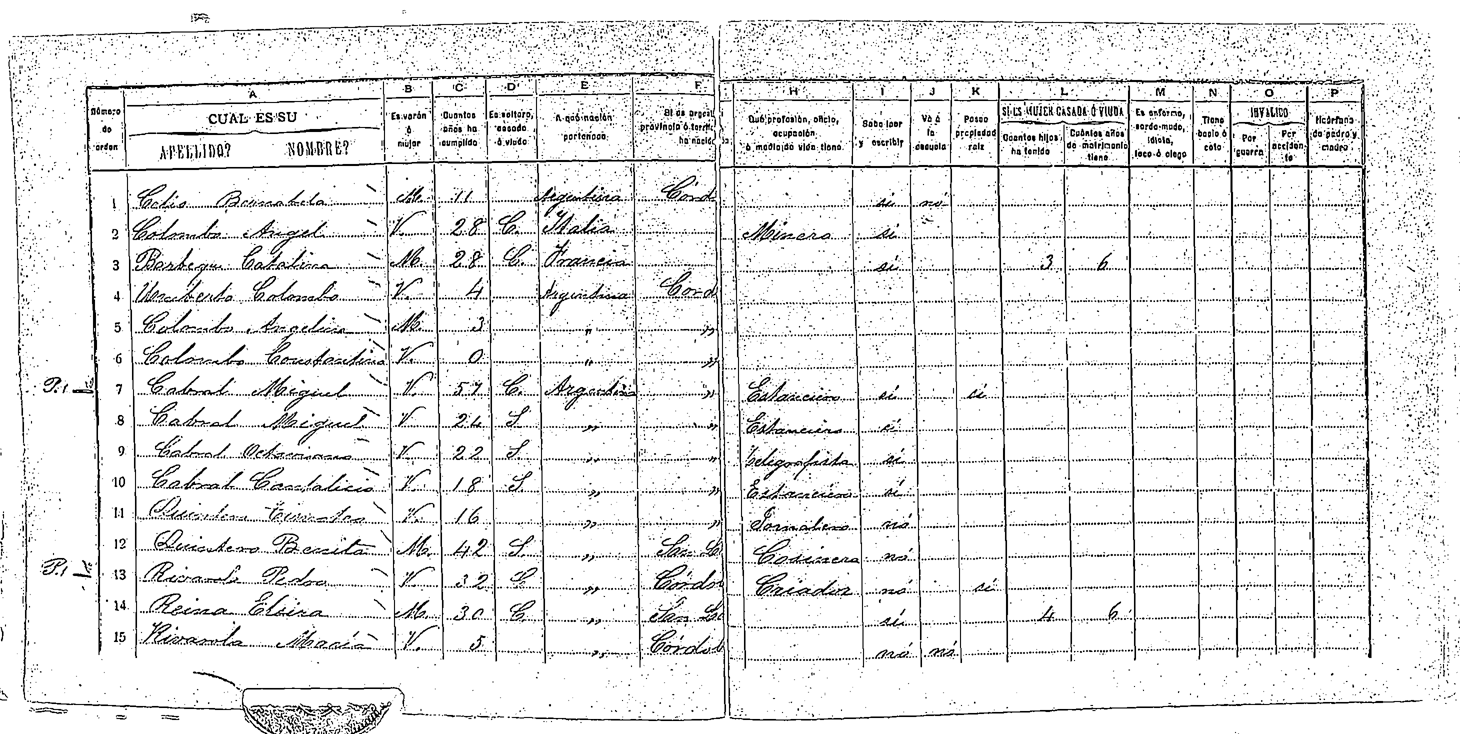
- Ledin (2026) sets aside 14 pages for the blur model, excluded from training and tuning. This was its best test page, not a random sample
- We use the median-blurred Figure 5.16, scored against reference A.31. The image displayed here is a thresholded copy
Run the Census Fine-Tune
- Download/merge the adapter and download the selected held-out image:
- Run the small Python caller directly, without a server:
- Base weights and the merged copy each need about 17 GB. The image extractor needs Poppler; source files stay in
build/ - Server-based benchmark commands also save responses and run metadata; the small caller above prints raw JSON
Call the Adapted Model on an Image Path
handwriting_mlx.py loads the merged weights inside Python, without a server:
import json
from pathlib import Path
from mlx_vlm import load, generate
from mlx_vlm.prompt_utils import apply_chat_template
from mlx_vlm.utils import load_config

model_path = "build/handwriting/argentina-model"
image_path = "build/handwriting/argentina/holdout/source-000.png"
data = Path("slides/data/handwriting/argentina/holdout")
source = json.loads((data / "finetuned-json/source.json").read_text())
messages = [
    {"role": "system", "content": source["system_prompt"]},
    {"role": "user", "content": source["user_prompt"]},
]
model, processor = load(model_path)
prompt = apply_chat_template(
    processor, load_config(model_path), messages, num_images=1,
)
result = generate(model, processor, prompt, image=[image_path],
                  max_tokens=8192, temperature=0.0, verbose=False)
print(result.text)source.jsonsupplies the author’s full JSON instructions and made-up schema example; it supplies no answers for this page- Use this prompt with the fine-tuned model; use
OCR_PROMPTfor the base-model HTML runs
Holdout: Does the Advantage Survive?
holdout = pd.read_csv(argentina_dir / "holdout/scores/summary.csv")
holdout_labels = ["Chandra 1 / HTML", "Chandra 1 + LoRA / JSON",
                  "Chandra OCR 2 / HTML"]
holdout = holdout.set_index("model").loc[holdout_labels]
holdout_table = pd.DataFrame({
    "Model / output": ["Chandra 1 / HTML", "Original LoRA / JSON",
                       "Chandra OCR 2 / HTML"],
    "Character accuracy": holdout.character_accuracy.map(
        "{:.1%}".format).to_numpy(),
    "Age digit accuracy": holdout.digit_accuracy.map(
        "{:.1%}".format).to_numpy(),
    "Exact-cell errors": [
        f"{r.errors:.0f}/{r.available_cells:.0f} = {r.error_rate:.1%}"
        for r in holdout.itertuples()],
})
display(HTML(holdout_table.to_html(index=False)))| Model / output | Character accuracy | Age digit accuracy | Exact-cell errors |
|---|---|---|---|
| Chandra 1 / HTML | 83.7% | 100.0% | 34/90 = 37.8% |
| Original LoRA / JSON | 92.9% | 96.2% | 11/90 = 12.2% |
| Chandra OCR 2 / HTML | 84.5% | 96.2% | 28/90 = 31.1% |
- Same 15 people × 6 fields, common image, BF16 weights, and greedy decoding. Each model uses its native output prompt
- Source-audited results: all 90 cells are available, but OCR 2 requires a structural repair for 54 cells. These reading scores do not establish that it can recover the layout unaided
- The blur LoRA also gives 11/90. Input blur matches its training, and the author selected its best page; the original adapter was trained without blur. This is not a representative comparison
Credit the Model That Gets the Layout Right
layout_table = pd.DataFrame({
    "Model": holdout_table["Model / output"],
    "Automatic cells": [f"{r.automatic_cells:.0f}/90"
                        for r in holdout.itertuples()],
    "Assisted cells": holdout.assisted_cells.to_numpy(),
    "Automatic exact recovery": holdout.automatic_exact_yield.map(
        "{:.1%}".format).to_numpy(),
})
display(HTML(layout_table.to_html(index=False)))| Model | Automatic cells | Assisted cells | Automatic exact recovery |
|---|---|---|---|
| Chandra 1 / HTML | 90/90 | 0 | 62.2% |
| Original LoRA / JSON | 90/90 | 0 | 87.8% |
| Chandra OCR 2 / HTML | 36/90 | 54 | 31.1% |
- The reader aligns 15/15 rows for original Chandra and the fine-tune, versus 6/15 for OCR 2. Its colspan rule was added after viewing Chandra 1’s output
- The fine-tune has the strongest automatic exact recovery on this page
- Availability is not correctness: original Chandra still places some values in the wrong columns, including the two filled property cells. Those remain disagreements
- Keep both measures: automatic recovery for a usable pipeline, and reading accuracy after documented alignment to diagnose the handwriting model
When the Table Breaks
from bs4 import BeautifulSoup

html_path = argentina_dir / "holdout/chandra2-html/prediction.html"
html_rows = BeautifulSoup(html_path.read_text(), "html.parser")
entries = [[td.get_text(strip=True) for td in tr.find_all("td")]
           for tr in html_rows.find_all("tr") if tr.find_all("td")]
broken_rows = pd.DataFrame([entries[5][:6], entries[6][:6]], columns=[
    "Row no.", "Name 1", "Name 2", "Sex", "Age", "Marital status",
])
display(HTML(broken_rows.to_html(index=False)))| Row no. | Name 1 | Name 2 | Sex | Age | Marital status |
|---|---|---|---|---|---|
| 6 | Colombo | Constantino | V. | 0 | |
| P.1 | 7 | Cabral | Miguel | V. | 57 |
- Actual OCR 2 output: the sixth row fits the printed columns. The seventh starts with
P.1, a margin note, pushing the row number and name one column right - OCR 2 also drops the province column. The right side then lines up by coincidence; a uniform shift would put other variables in the wrong columns
- The HTML parses, yet its body contradicts its header. Valid output syntax does not guarantee a usable DataFrame
- A source-checked map shifts only the left-page fields and recovers the other nine rows. It changes no predicted text; the hash-bound audit records this retrospective assistance
Holdout Labels Also Need an Audit
| Model | Exact errors / 90 | Omit 5 uncertain cells / 85 |
|---|---|---|
| Chandra 1 / HTML | 34 | 30 |
| Original LoRA / JSON | 11 | 6 |
| Chandra OCR 2 / HTML | 28 | 23 |
- A visual review flagged four names and one occupation before we inspected model predictions. We retain the published labels; excluding these cells changes the denominator to 85
- After the source audit, 15 disagreements for each base model concern only a period (
V.versusV). Neither adapter has these discrepancies; digit and character scores retain punctuation - Reference agreement measures reading, coding conventions, and table extraction together. Ignoring accents alone leaves all these scores unchanged
- Saved responses and protocol, holdout search, and download and scoring commands
Thai Bills
Vibe-coding Warning!
This material has not yet been fully vetted and checked.
A Thai Bill Fine-Tune
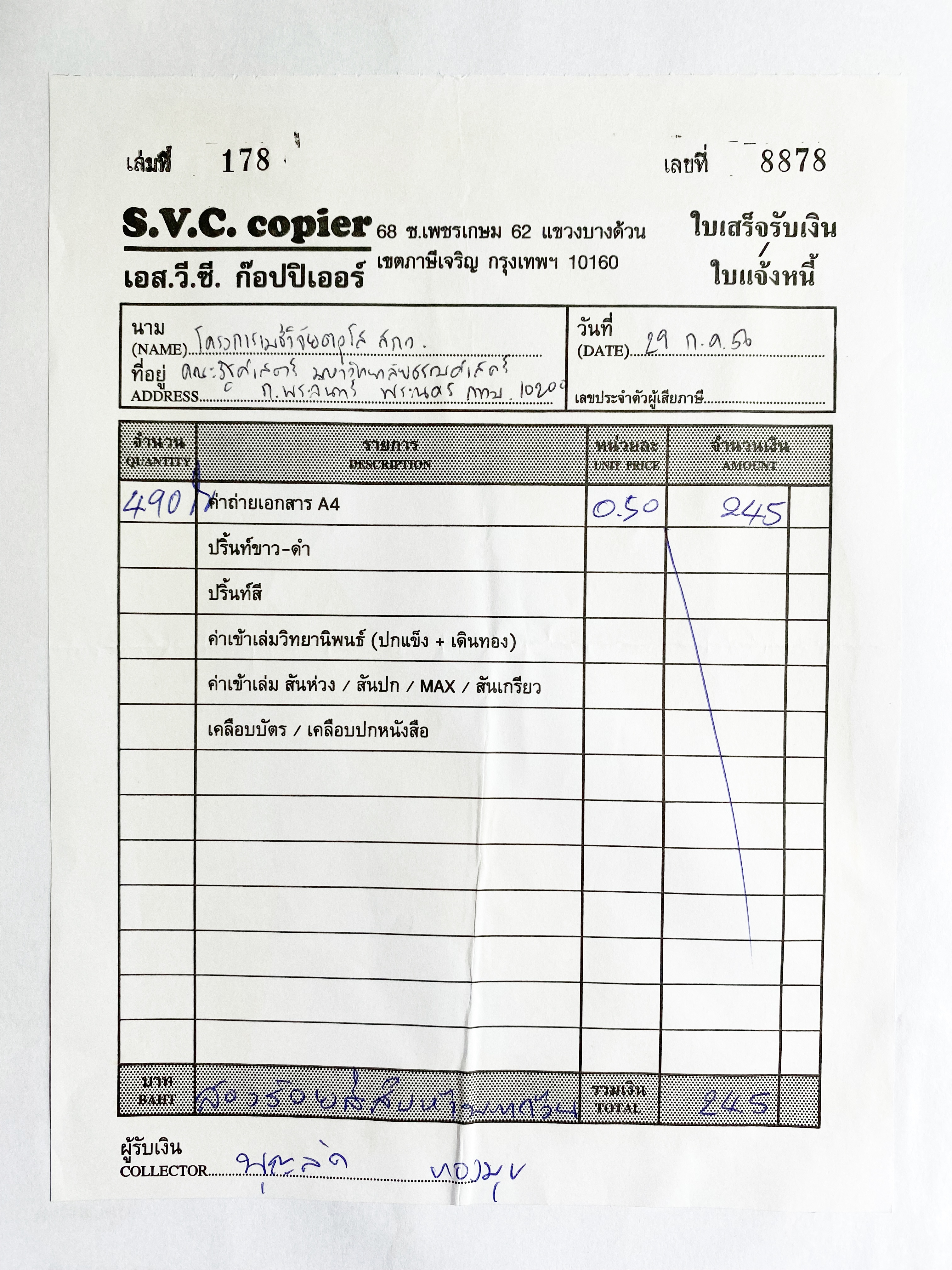
ChandraOCR2_AppenDocmerges a fine-tune into Chandra OCR 2- LoRA learns small matrix updates. The author’s configuration uses rank 32 and scaling parameter 64
- The author’s dataset includes this Appen bill with printed headings and handwritten entries
- We run one cropped item row locally. Both images are included (Appen Limited, CC BY-SA 4.0)
- The image is from the dataset’s train split; exact adapter training membership is undocumented. We have no held-out evaluation for this example
A Merged Fine-Tune Loads Like the Base Model
Download the Thai checkpoint, which already includes its adapter:
Reuse the Chandra Python call, changing the model and image paths:
image_path = "slides/data/handwriting/appen/input.png"
model, processor = load(model_path)
prompt = apply_chat_template(
    processor, load_config(model_path), OCR_PROMPT, num_images=1,
)
result = generate(model, processor, prompt, image=[image_path],
                  max_tokens=2048, temperature=0.0, verbose=False)
print(result.text)- It returns HTML. Unlike the Argentine adapter, this model uses Chandra’s OCR prompt
- The same
handwriting_mlx.pyaccepts--model build/handwriting/appen-model; no separate adapter merge is needed
From a Handwritten Bill to JSON

{
  "quantity": "490",
  "description": "ค่าถ่ายเอกสาร A4",
  "unit_price": "0.50",
  "amount": "245"
}- The model’s HTML table becomes JSON through
pd.read_html. The Thai description denotes A4 photocopying; \(490 \times 0.50 = 245\) - Full-page extraction repeated empty rows. This demonstrates the visible crop; locating it is a separate step
- Pinned setup and runnable extraction script
Fine Tuning YourselfOptional
From Labeled Pages to a LoRA Adapter
- Split writers/documents: training, development, and untouched test pages
- Pair scans with verified answers: consistent HTML or JSON targets, using the model’s image processor and chat template
- Train LoRA updates: freeze base weights; supervise the answer tokens and end token
- Choose settings on development pages: learning rate, epochs, rank, and image size. Inspect generated tables
- Compare on test pages: base versus adapter, with coverage and character/digit errors. Save the adapter, base revision, and processor
- Guides: PEFT / LoRA, TRL vision-language training, and the census author’s code. Recipe sketch; no training run here
References
- York CCRI: Toronto Area Test Sample and data-entry manual
- Library and Archives Canada: 1901 census
- Constum et al. (2022): POPP data and citation
- Datalab: Chandra OCR 2
- MLX-VLM: local inference on Apple Silicon
- Appen Thai fine-tune and source images
- Argentine census adapter and author’s source pages and code