| Pair | Local Qwen | OpenAI |
|---|---|---|
bank, banks |
0.9514 | 0.7883 |
bank, river |
0.6267 | 0.4143 |
bank, money |
0.8040 | 0.4347 |
river, money |
0.6139 | 0.3746 |
Open-Weight LLMs on Your Machine
Graduate Quantitative Economics and Datascience
Overview
Running an LLM on Your Own Computer
- The model weights are a file on your disk: no account, no API key, no per-token bill, and nothing you type leaves the machine
- Open-weight models (Qwen, Llama, Gemma, Mistral, …) are released under licences that let anyone download and run them
- Seeing the pieces (weights, a runtime, an HTTP API) shows what a hosted service such as OpenAI’s is made of
- The programmatic workflow is the same as for a commercial API: the Python code in this deck runs against OpenAI or Google after changing three settings
What We Will Install
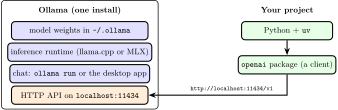
- Ollama: one MIT-licensed program that downloads weights, runs them, gives you a chat prompt, and serves an HTTP API
- The
openaiPython package: a client that speaks that API, installed withuv
Models and Memory
- A tag such as
2bor27bgives the approximate number of parameters in billions - Quantization stores weights at reduced precision: the models below use roughly four or eight bits per weight, making the download smaller than full-precision weights
- Apple Silicon Macs share one pool between CPU and GPU (unified memory). On Windows/Linux with a discrete GPU, its memory (VRAM) is separate from system RAM
- Ollama can also run on the CPU or split a model between CPU and GPU, at a cost in speed; leave room for the operating system and the conversation’s growing KV cache
- Local model tags run on your machine; tags ending in
:cloudsend prompts to a remote service and require an internet connection
Suggested Models: September 2026
Starting points for short text demos; download sizes are not total RAM usage.
| RAM | Computer | Model tag | Download |
|---|---|---|---|
| 8 GB | Any OS | qwen3.5:2b |
2.7 GB |
| 16 GB | Any OS | qwen3.5:4b |
3.4 GB |
| 32 GB | Any OS | qwen3.5:9b |
6.6 GB |
| 48 GB | Apple Silicon Mac | qwen3.8:27b-mlx |
18 GB |
| 64 GB | Apple Silicon Mac | qwen3.8:27b-mxfp8 |
32 GB |
| 32+ GB | Windows/Linux, 24+ GB VRAM | qwen3.8:27b |
18 GB |
Installing Ollama
Install on macOS
- Download
ollama.dmgfrom ollama.com/download/mac and drag it to Applications, or, with Homebrew already installed,
- Open Ollama from Applications and finish its first-run setup; keep it running. Alternatively, run
ollama servein a separate terminal and leave it open - Then in another terminal
- On a 48 GB Mac the large model is
ollama pull qwen3.8:27b-mlxandollama run qwen3.8:27b-mlx pullstores the weights in~/.ollama;runloads them into memory and opens a prompt;ollama listshows what you have
Install on Windows (and Linux)
- Download and run
OllamaSetup.exefrom ollama.com/download/windows; the alternativewinget install --id Ollama.Ollamauses a community-maintained package rather than an official one - Then, in PowerShell, the same two commands as on macOS
- Linux:
curl -fsSL https://ollama.com/install.sh | shinstalls a background service, then the same commands (a tarball for installs without root is on docs.ollama.com/linux) - The commands and API are the same across platforms; the MLX models in the table need an Apple Silicon Mac
Chatting in the Terminal
- The same chat interface for every model: this screenshot shows
qwen3.5:4bon a Linux workstation; useollama run qwen3.5:2bon an 8 GB laptop
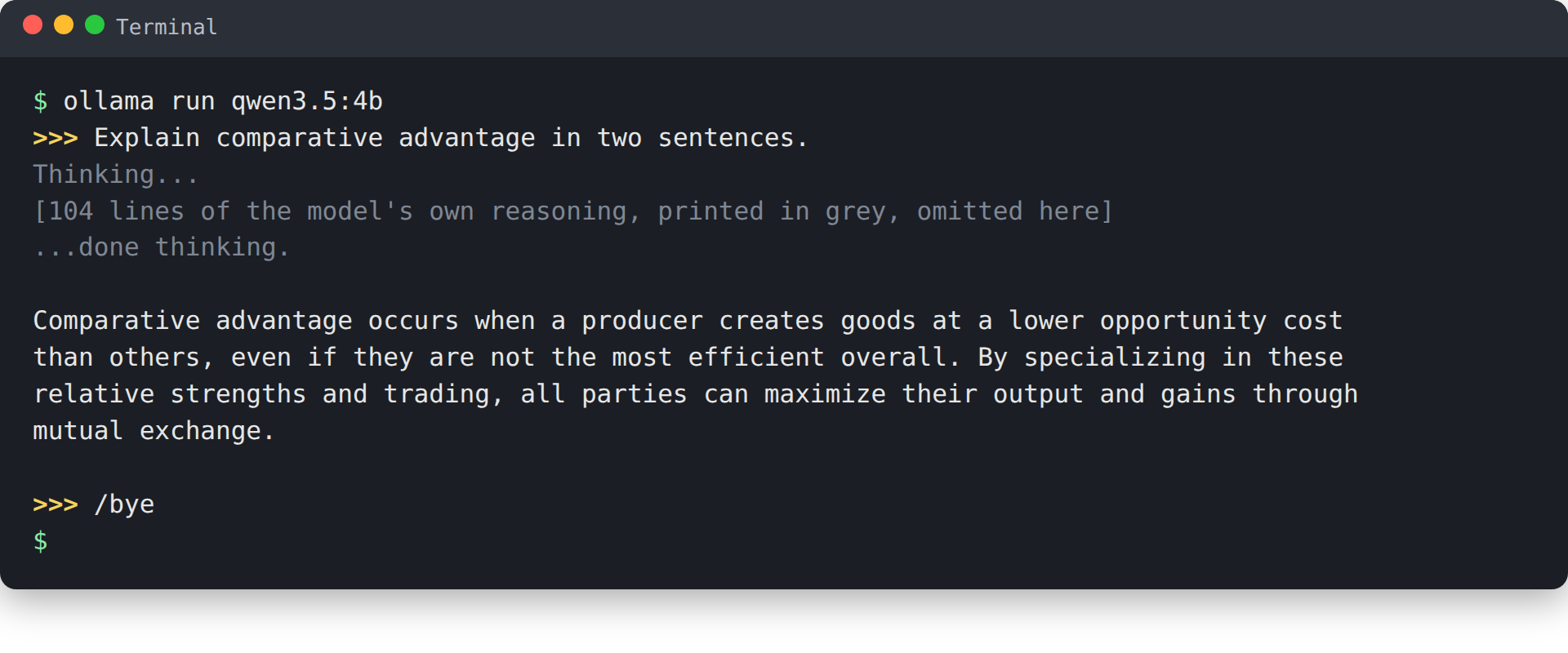
- On macOS and Windows the Ollama app also opens a chat window over the same models (announcement); the terminal is what we use because it is identical everywhere
Calling the Model from Python
Same Model, Now Through Python
- In a new project (
uv init local-llm, thenuv add openaiinside it), save the script below anduv run python local_llm.py
from openai import OpenAI

client = OpenAI(base_url="http://localhost:11434/v1", api_key="ollama")
question = "Explain comparative advantage in two sentences."
response = client.chat.completions.create(
    model="qwen3.5:2b",
    messages=[
        {"role": "system", "content": "You are a concise economics tutor."},
        {"role": "user", "content": question},
    ],
)
print(response.choices[0].message.content)- The client requires an
api_key, and Ollama ignores it, so any string works
What Is Actually Happening

- The
openaipackage is only a client: it turns themessageslist into a JSON request, sends it over HTTP, and unpacks the JSON reply - The request goes to
localhost, so no request goes to OpenAI and nothing about your prompt leaves the machine - The Ollama server does the work: it loads the weights, runs the model on the CPU or GPU, and returns the tokens
Embeddings Redux
A Local Embedding Model
- A chat model returns text; an embedding model maps text to a vector for similarity, classification, clustering, or retrieval
- Download a small embedding-specific model:
ollama pull qwen3-embedding:0.6b(639 MB) - The same OpenAI client now calls the
/v1/embeddingsendpoint
import numpy as np
from openai import OpenAI

client = OpenAI(base_url="http://localhost:11434/v1", api_key="ollama")
words = ["bank", "banks", "river", "money"]
response = client.embeddings.create(
    model="qwen3-embedding:0.6b", input=words
)
E = np.array([item.embedding for item in response.data])
print(E.shape)  # (4, 1024)
Redo the “Bank” Comparison
The same words as the earlier embeddings example, rerun in September 2026 with local Qwen (1,024D) and hosted OpenAI (3,072D):
- Both models put
bankclosest tobanks, thenmoney, thenriver - Compare rankings within one embedding space. Absolute cosine values are not comparable across models because each model learns a different space
- Runnable local version:
local_embeddings.py - CI reads the committed cache. Refresh it with
uv run python utilities/build_embedding_comparison.py, then render this deck with--no-cache
One Client, Many Backends
Why the OpenAI SDK for a Model that Is Not OpenAI’s?
- The shape of OpenAI’s chat API (
messages, roles,choices) became a de facto standard; Ollama, Google, and most hosting services serve the same shape as a compatibility interface - Everything that differs is three settings
| Backend | base_url |
api_key |
model |
|---|---|---|---|
| Ollama | http://localhost:11434/v1 |
any string | qwen3.5:2b |
| Google Gemini | https://generativelanguage.googleapis.com/v1beta/openai/ |
a Gemini key | gemini-3.8-flash |
| OpenAI | the default | an OpenAI key | gpt-4o-mini |
The NLP deck creates
OpenAI()with the defaults (the last row); its chat and embedding code runs locally with the first row’s settings and a local embedding model nameBasic chat is portable; provider-specific features are not (Ollama’s endpoint has no
logprobsorlogit_bias, Gemini’s compatibility layer is beta, and embedding model names differ)
Same Code, Different Backend
- Three settings from the environment, Ollama by default:
local_llm.py
import os
from openai import OpenAI

client = OpenAI(
    base_url=os.environ.get("LLM_BASE_URL", "http://localhost:11434/v1"),
    api_key=os.environ.get("LLM_API_KEY", "ollama"),
)
question = "Explain comparative advantage in two sentences."
response = client.chat.completions.create(
    model=os.environ.get("LLM_MODEL", "qwen3.5:2b"),
    messages=[
        {"role": "system", "content": "You are a concise economics tutor."},
        {"role": "user", "content": question},
    ],
)
print(response.choices[0].message.content)- For OpenAI set
LLM_BASE_URL=https://api.openai.com/v1,LLM_MODEL=gpt-4o-mini, and the key inLLM_API_KEY; the key never enters the file or git
Things to Try and Extra Materials
- Change the system prompt; ask the same question with
temperature=0andtemperature=1.5; ask for JSON withresponse_format={"type": "json_object"} - Run one prompt on the small and the large model and compare speed and quality; ask an economics question you know the answer to
- Point the script at another provider and check that only the three settings change
- References
- Ollama documentation and its OpenAI compatibility page
- Local embeddings:
qwen3-embedding:0.6band Ollama’s/api/embeddocumentation - Model cards Qwen3.5-2B and Qwen3.8-27B; Ollama tags
qwen3.5andqwen3.8 - Gemini’s OpenAI compatibility and the
openaiPython SDK
Orchestration FrameworksOptional
LangChain as an Example
- Every call in the NLP and text classification decks is one hand-built request: a
messageslist of role dicts, a loop over articles, a comprehension overresponse.data - LangChain wraps these in composable objects
ChatOpenAIbundles the client, model, and settingsSystemMessage,HumanMessage, andAIMessagereplace the role dicts.batch(..., config={"max_concurrency": 3})replaces the classifier loop and adds concurrency and retries- The same
.invokeworks onChatAnthropicorChatGoogleGenerativeAI, whose wire formats are not OpenAI-compatible
- Runnable version against Ollama:
langchain_chat.py, afteruv sync --extra extrasin the course repository
When It Pays Off
- Multi-step pipelines: prompt template, then model, then output parser
- Structured output parsed into typed objects
- Retrieval-augmented generation: embed documents, store them, retrieve the closest into the prompt
- Agents that call tools in a loop
- Costs: another vocabulary, a large dependency tree, and a fast-changing API
- For one request per slide the raw client is shorter, and the
messageslist is what every framework sends anyway
- For one request per slide the raw client is shorter, and the
- Same idea elsewhere: LlamaIndex and DSPy